
Create a new image from the description
Edit the subject, setting or colors in your prompt, then use text to image to explore a new composition inspired by the reference.


Jynno’s image to prompt generator turns a reference image into an editable prompt describing its subject, composition, lighting and style. Review the analysis, then adapt the wording for the image you want to create.
Or try a sample
No model is currently available for this feature.
Create an imageSubject
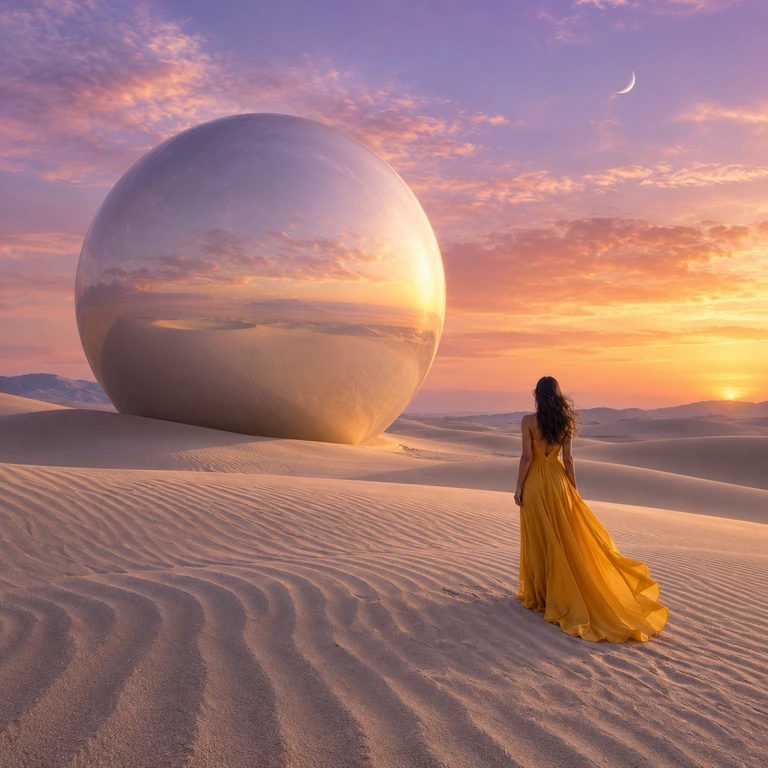
A woman with long dark wavy hair, seen from behind, wearing a flowing sleeveless golden-yellow gown that billows slightly at the hem, standing on rippled desert sand and gazing toward a gigantic mirrored metallic sphere resting on the dunes; the sphere reflects the sunset sky, clouds, and sand, while an orange sun sets near the horizon at right and a thin crescent moon hangs in the upper sky.
Composition
Wide landscape framing, slightly wide-angle perspective, woman placed in the lower right of the frame with the massive sphere dominating the left and center, strong diagonal line of sand ripples leading the eye inward, low horizon line, deep focus throughout.
Lighting
Warm sunset backlight and side light from the right horizon, golden-hour glow bathing the dunes, soft pink and orange sky illumination, gentle shadows raking across the sand ridges, bright specular reflection on the sphere, cool violet tones in the upper sky.
Style
Photorealistic surreal fantasy landscape, cinematic digital matte-painting aesthetic, high-detail rendering with smooth gradients, subtle digital clarity rather than heavy film grain, dreamlike sci-fi realism.
Camera
Apparent wide-angle lens perspective with an expansive deep depth of field, sharp foreground sand texture and sharp distant sphere, natural rectilinear rendering with no obvious distortion, cinematic landscape look.
Negative
extra people, duplicate figures, distorted sphere geometry, malformed hands, text, watermark, logo, signature, blurry, low resolution, oversaturated, flat lighting
Mood & Color
Serene, contemplative, dreamlike and vast, warm golden-pink color grading contrasted with cool lavender sky, quiet awe and otherworldly stillness.
Upload any picture or pick a sample photo to start reverse engineering.
Extracts 7 structural visual attributes: subject, composition, lighting, camera, style, mood, and negatives.
Switch tabs to get tailored prompt syntax for Midjourney, Flux, SD, DALL-E, Gemini, and ChatGPT.
An image to prompt generator turns visible details into a text description. It helps you describe a look and write a new brief; it cannot recover the exact original prompt or settings.
Edit the subject, setting or colors in your prompt, then use text to image to explore a new composition inspired by the reference.
If you need to retain the photographed object or layout, upload the source to image to image. A description is not a substitute for the visual reference.
Compare the reference image with its subject, composition, lighting and style breakdown. Edit the prompt below to keep the visual details you need for your next image.
Read the subject, composition and sunset lighting, then copy the prompt.
Use a reference where the subject, composition and lighting can be seen without guessing.
Check the described subject, arrangement and light. Keep visible facts; correct uncertain materials, camera estimates and any detail that does not match the reference.
Edit the output before copying it. Keep the composition or light you need, change the subject or setting, and choose a prompt format suited to your next tool.
A visual analysis can help explain an image. It cannot recover the exact original prompt or camera settings from pixels alone.
“A blue plate seen at a low close angle” describes the image. A precise lens name or aperture is an estimate unless you have the original metadata.
To borrow the lighting, keep its direction, softness and color, then replace the subject and setting. To reuse the composition, keep the framing and subject placement. Use image-to-image with the reference when the original subject needs to remain recognizable.
The example prompts are editable. For your own upload, review the workbench’s analysis and selected tier, then correct colors, materials and guessed camera details.
The workbench offers general and model-oriented prompt formats. A format helps you rewrite a description; it does not connect that generation model here.
Use your plan credits for images and videos. Review the selected tool, settings and credit quote before each generation.
$9.99/ month
800 credits / month
Credits renew monthly and expire at the end of the billing period.
View plan$24.99/ month
2,500 credits / month
Credits renew monthly and expire at the end of the billing period.
View plan$59.99/ month
6,200 credits / month
Credits renew monthly and expire at the end of the billing period.
View planJynno analyzes visible pixels and writes a new prompt; it does not recover the original generation instructions or hidden settings. Review the suggested wording against the image. Camera settings, hidden objects and lighting equipment may be inferred.
Choose a reference, understand its visual ingredients and make the description your own.
Analyze a reference