• Workspace
Creation
  • AI Video
  • AI Image
Features
  • AI Video Effects
  • Text to Video
  • Image to Video
  • Reference to Video
  • AI Video Editor
  • Mimic Motion
  • Video to Video AI
  • Video Upscaler
  • Face Swap Video
  • Video Background Remover
  • AI Video Extender
  • Text to Image
  • Image to Image
  • Image to Prompt
  • PNG Maker
  • Pricing
Jynno
Vanish

Best photo:

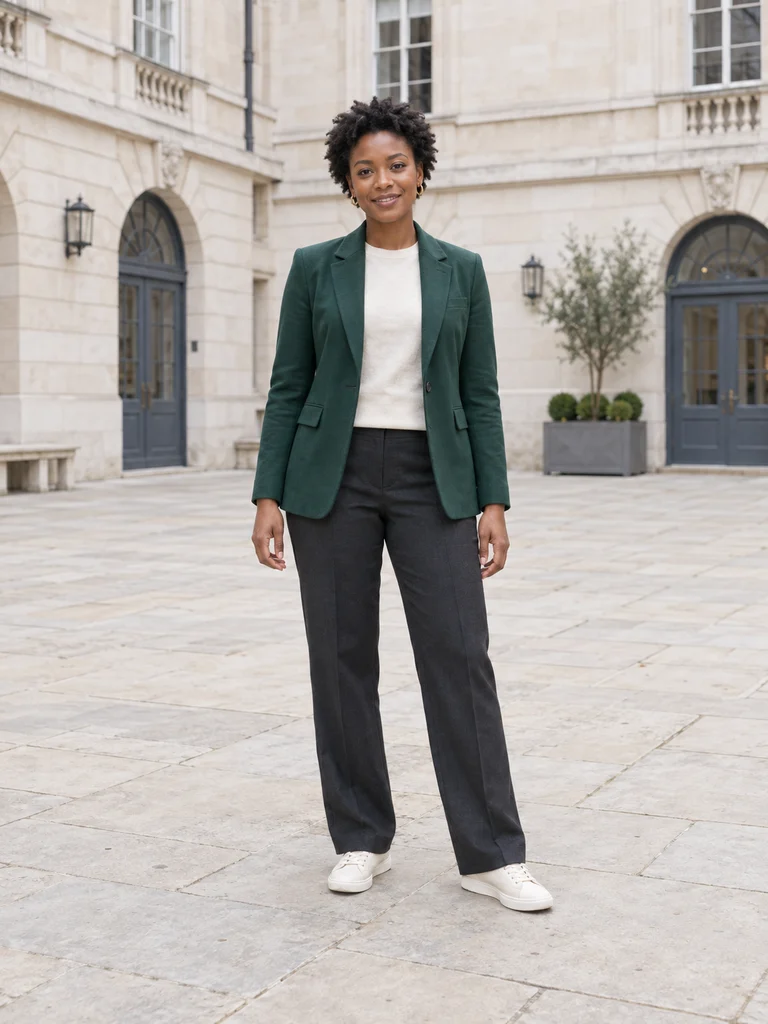
One full-body person in a clearly visible outer layer, with shoes and open floor in view.

Customize motion
  1. AI Video Effects
  2. /
  3. Vanish

Vanish

Disappear in a beat. Leave your outfit behind.

Example photo
Example photo
Vanish
Effect preview

What changes

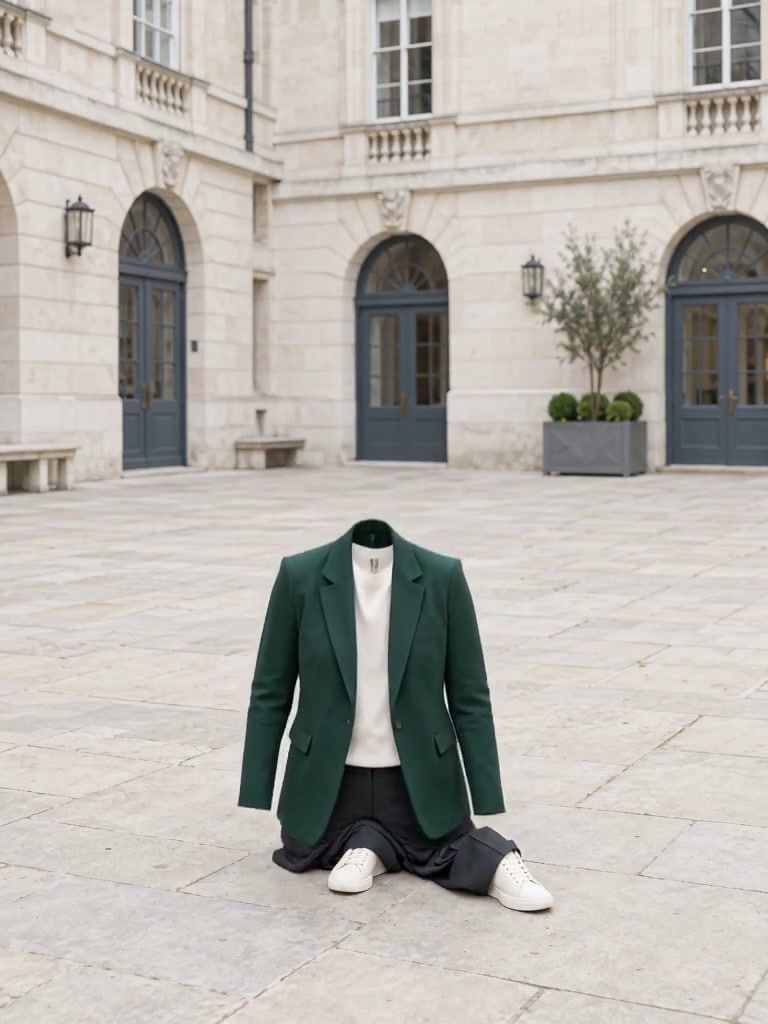
The person disappears and the empty outer clothes drop onto the ground.

Upload a clear photo and adjust the motion prompt to fit your scene. Check the settings and credit cost before generating.

Choose another effect

Build around one clear visual event

01

The visible change

The person disappears; the empty outer garments lose their support and fall.

02

The details to retain

One full-body subject, visible shoes and a clear floor.

03

Keep the body and floor in view

Avoid a seated pose, hidden feet or a tightly cropped portrait. Use a simple background so the ending is readable.

The person disappears.The clothes remain.

Make the person vanish while the empty outer clothes collapse onto the same ground. Keep the ending focused on the recognisable garments and footwear.

A fully clothed standing person before the vanish effect
Example photo

Your photo.Your direction.

Keep in view
One full-body subject, visible shoes and a clear floor.
The visual change
The person disappears; the empty outer garments lose their support and fall.

Try this effect

Vanish, from a photo to a moving result

The person disappears; the empty outer garments lose their support and fall.

Try this effect
A fully clothed standing person before the vanish effect

A photo, an action,A clear visual change

Use a standing full-body photograph with the feet and floor visible. The empty clothes need room to fall.

  1. 01

    Keep the body and floor in view

    Avoid a seated pose, hidden feet or a tightly cropped portrait. Use a simple background so the ending is readable.

  2. 02

    Give the change a clear order

    Describe the disappearance first, then the empty clothes collapsing onto the floor. Keep the camera and surrounding scene steady.

  3. 03

    Review the empty ending

    Check that no person remains and that the clothing and shoes are recognisable on the floor. If the fall is hidden, use a clearer standing pose and a wider crop.

Bring this effect into your work

Surprise endings

Let the person disappear and end on the revealed background.

Street visual experiments

Use a clear silhouette and stable setting to show the disappearance.

Transition material

Prepare an empty scene after the subject vanishes for your own edit.

Explore anotherVisual transformation

AI Kiss Video Generator

Turn one photo of two adults into a gentle kissing video with MiniMax H3. Try a brief kiss, a cheek kiss, or a romantic moment.

AI Hug Video Generator

Make a warm hugging video from one photo of two adults with MiniMax H3. Create a couple embrace, a friends reunion, or a family hug.

City flight

Lift off and glide above the city skyline.

Everything blooms

Watch flowers grow across an everyday object.

Giant pet

Make your seated pet grow in place against the same surroundings.

Step out of the frame

A painted character steps into the real world.

Petal drift

A solid shape becomes petals carried on the breeze.

Doodle to life

A little sketch lifts off the page.

City folding

Curve a familiar street into an impossible urban arch.

Street Colossus

Grow into a giant above the same city street.

High Flip

Sweep over your head into a vast red desert.

Thunder Strike

Charge the scene with branching cinematic lightning.

Portal Reveal

Open a portal into a moonlit forest.

Energy Wings

Unfold two luminous golden wings.

AI Twerk Video Generator

Turn a full-body character photo into a playful, rhythmic dance clip.

Bigfoot Video Generator

Bring a Bigfoot character to life in a playful forest selfie.

Plans for your next creation

Use your plan credits for images and videos. Review the selected tool, settings and credit quote before each generation.

Starter

$9.99/ month

800 credits / month

Credits renew monthly and expire at the end of the billing period.

View plan

Creator

$24.99/ month

2,500 credits / month

Credits renew monthly and expire at the end of the billing period.

View plan

Pro

$59.99/ month

6,200 credits / month

Credits renew monthly and expire at the end of the billing period.

View plan
See all plans and credit packs

AI video effectsQuestions before you create

A portrait cannot show the full disappearance or the clothes landing. Use a full-body standing image with an unobstructed floor.

This direction leaves empty outer clothing and footwear behind. Name the garments to preserve and review the ending rather than asking for the whole scene to disappear.

The reference guides the subject and the scene, but a generated video can change details. Check faces, outlines, clothing, small text and the background before using the result.

An effect starts with a focused transformation request. Image to Video is better when you want to describe your own action, camera movement or a different sequence.

Match your photo to the effect’s input guidance. A blooming object, a framed character and a full-body person need different compositions. Results can vary with subject shape and the amount of visible detail.

Start with your photoGive the scene a new event

Choose your image

AI Image

  • AI Image Generator
  • Image to Image AI
  • AI Photo Editor
  • Watermark Remover
  • Magic Eraser
  • Image Upscaler
  • Background Remover
  • Face Swap Photo
  • Chat to Image

AI Video

  • AI Video
  • Text to Video
  • Image to Video
  • Reference to Video

AI Video Effects

  • AI Video Effects
  • AI Kiss Video Generator
  • AI Hug Video Generator
  • City flight
  • Everything blooms
  • Giant pet
  • Step out of the frame
  • Petal drift
  • Doodle to life
  • City folding
  • Vanish
  • Street Colossus
  • High Flip
  • Thunder Strike
  • Portal Reveal
  • Energy Wings
  • AI Twerk Video Generator
  • Bigfoot Video Generator

Product

  • Jynno
  • All AI Tools
  • Agent
  • Pricing

Resources

  • Creative guides
  • Privacy Policy
  • Terms of Service
© 2026 Jynno. All rights reserved.