
AI Video Editing for E-Commerce & Apparel Sellers: Color Variants and Try-On from One Clip
Practical guide for Shopify, Amazon, and TikTok Shop sellers to recolor products, try on apparel photos in short videos, remove backgrounds, and upscale to 4K without reshooting.

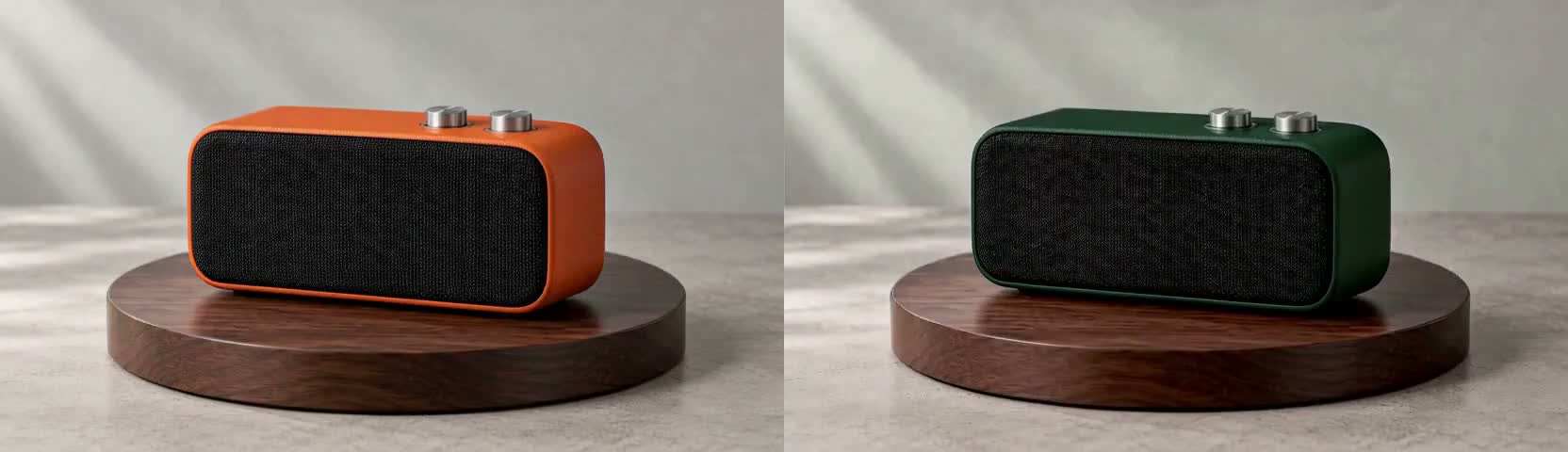
For online stores and DTC brands, filming a separate video for every colorway or new clothing SKU gets expensive quickly. When you already have one clean 3–10 second (MP4 or MOV, up to 50 MB) creator demo or product turntable clip, you can use Jynno’s video editing tools to test new variants before committing to another studio shoot.
1. Test multiple product colorways from one demo clip
If you sell hardware, bags, drinkware, or basics in several colors, start with AI Video Color Changer. Upload your base clip and write a focused instruction naming the item, target shade, and what must remain untouched:
Change the orange speaker casing to forest green; keep the control knobs, wooden table, room background, and lighting unchanged.
You can preview how a new olive, crimson, or matte-black variation feels in motion at 480P first, review the clip for shape and surface reflections, and then run 720P on winning concepts.
2. Demo catalog garments on an existing creator clip
Apparel and boutique sellers can pair one clean creator video with a front-facing product shot or flat lay (PNG, JPG, or WebP, up to 5 MB) inside Change Clothes in Video with a Photo:
Dress the woman in the green wrap dress from the reference image; keep her face, hair, walking pace, shoes, and outdoor background unchanged.
Need to test broader seasonal styling directions without a product photo ready? Use AI Video Clothes Changer to describe fabrics, silhouettes, or outfits in text.
3. Clean cutouts and 1080P/4K finishing for store pages
- Isolate the moving product: Use Video Background Remover when you want the moving item separated from its backdrop for clean ad overlays or landing-page hero loops.
- Give short hooks breathing room: If a useful product clip ends slightly too early, extend it by
3–15 secondsat768Pwith AI Video Extender. - Upscale final winners last: Run Video Upscaler (
720P,1080P,2K, or4K) only on clips that passed visual review.
Seller quality-control checklist before running ads
Generative video editing creates new frames, so treat every output as a draft to inspect against your physical SKU:
- Logos, labels, and packaging text: Pause across turns to make sure markings did not warp. Overlay crisp vector labels in your final video editor whenever exact branding is critical.
- Buttons, zippers, and seams: Check sleeves, collars, and hardware during hand or body movement.
- True-to-life color accuracy: Generative recoloring approximates the requested shade—do not market an unverified AI tint as an exact color swatch without comparing it to your real product.
Pay-As-You-Go budgeting for seasonal launches
Sellers who only launch batches of products a few times per quarter do not need a recurring monthly subscription. Jynno’s Pay-As-You-Go credit packs ($3.99–$99.99, valid for 365 days) work across all fixed video editing tools, and every page displays the exact per-second credit quote before generation. Compare packs and memberships on Pricing.
E-commerce seller FAQ
Can I replace a product’s exact label text using only the video color changer?
No. Keep the original label intact in your prompt and inspect the finished frames carefully; if exact small typography is required for compliance or packaging accuracy, composite your real label in post-production.
Which resolution is best for TikTok Shop, Reels, or product detail pages?
Start with 480P while testing prompts, verify the 720P output, and finish approved keepers with Video Upscaler at 1080P or 2K/4K.
What if I only have static product photos and no base video yet?
Generate a starting motion shot from your product photo with Image to Video or plan a full storyboard in the AI Product Videos Planner first.
AI Video Color Changer · Try On Clothes with Photo · Video Background Remover · Video Upscaler